In 2008, we met Ellie and Jim Meachum at a RV park in Tucson, AZ. At a potluck dinner Ellie talked about writing a “blog.” As a long time journal keeper I was intrigued and Ellie was a huge help in the process of creating TinTeePeeLogCabin.
It’s time to close this chapter. As many of our long time readers know we now have a home in Montana and one in Arizona. RVing has taken a back seat to our other activities and we are OK with that decision. I’ve struggled to find a blogging subject each day and have resorted to writing less often—but still, it’s a struggle.
We’ve sold the North Ranch home and are leaving northwest Arizona heading to a quieter, slower pace of life in southeast Arizona. We will be busy as the property we purchased is a fixer-upper in the greatest sense of the words!
Join us as we take this new journey with a new blog--Restoration Cowboy Style. In a few days I will close comments to this blog and eventually will make it private.
Our friends Jane and Rich arrived yesterday—they are staying on the lot Michael and I used before we bought the house. Their Wyoming winter has been awful this year and they are seeking some warmth and sunshine. They arrived during a downpour—according to Jim Meachum’s rain gauge, North Ranch received 2.5 inches of rain over the weekend!! Jane is wonder woman—Rich is ill and no longer drives—Jane drove all the way from Wyoming pulling their travel trailer—yep, wonder woman!
Vulture Peak yesterday.
The desert is so green this year!
Jane and I made a trip to Wickenburg—grocery store, hardware store—regular ole errands. It’s so good to spend time with her again—we’ve been friends for 25 years—Jane was one of the nurses who I supervised at Powell Hospital in Powell, WY, pre-Michael. She likes to tell people, “she may have been my best friend but when you were called to Janna’s office and she shut the door, it didn’t matter if you were friends—you knew you were in trouble.”
On one side of the Sulphur Springs Valley we see the snow covered ChiricahuaMountains and on the west side of the valley we see the Dragoon Mountains. The elevation is about 4800 feet making nights and mornings very chilly but the days warm up nicely. This valley is wide and open—farming, ranching, wineries and people wanting to get away from the crowds make up this community. Oh, and don’t forget the tumbling tumbleweeds! We are here for a bit before heading back to North Ranch.
Sunset over the Dragoons last night.
We spent the night at the Escapees Saguaro Co-Op Park in Benson Tuesday night and saw this rig in action. You will notice the truck squatting as the ATV is lifted onto the bed—the truck was only a half ton pickup and did not have air bags although the owner did say air bags were next on the list.
And now for Verizon—just one big GRRRRR! All cellphones companies are awful about dangling that carrot and forgetting to tell you the rest of the story. From all the talk on blogs and forums even the folks who work for Verizon couldn’t keep the story straight! Robert Jae and Nina—you were correct—tethering has more meaning than just using your phone as a hotspot thus our Jetpack is subject to Verizon’s fine print. Technomadia Cherie states: “ Once you use 10GB of data your LTE speed will drop to 3G levels for the remainder of the month. Chris and Cherie are the go to experts for internet anything and I have more faith in their info than in anything a Verizon employee might deliver. With that said, I live chatted with a Verizon representative yesterday morning and here’s his statement:
“The 10GB is not a limit. This means once you reach 10GB the plan could have its data prioritized but that’s only if at that time you are in an area where the tower you are using has an overload of traffic.”
So, who knows????? We have the Jetpack and the iPhone so we can use 10GBs of data on each of these devices—but unlimited—not happening with Verizon I don’t think! We will stick with the unlimited plan as it’s less expensive than the plan we currently have with 24GBs. If necessary we will activate our old iPhone SIM card to gain more data. The whole scenerio leaves me with a bad taste in my mouth thank you very much Verizon!
Sunrise over the Chiricahua Mountains this morning.
“Hope you Realize that that unlimited data is on device data and only includes 10gig of high speed hot spot (tethered)data” comment by Robert Jae
Are we the only people on the planet who don’t tether?? We have a Verizon Jetpack which serves as our router/modem and one cellphone—an iPhone 6. The cowboy refuses to carry a cellphone. The only time I use the iPhone as a hotspot is if we are in the truck and I want to see something such as a map on a larger screen. We don’t pay for cellular data on the iPad so I just use the iPhone as a hotspot and connect to the phone with the iPad. So, are we the only people on the planet who don’t tether??
We were paying for 24GBs of data with Verizon—our bill ran about $155/month. Even if Verizon does slow down our speed after 22GB we will still come out better financially—with the jetpack and one phone our new bill with unlimited data is going to be about $108/month.
There are lots of articles about Verizon’s new plan out there—not all are accurate I’ve found. One author claimed you couldn’t have an unlimited plan with Verizon without signing up for AutoPay—not true at least in our case.
We are currently out and about again in the motorhome—life is good!
It rained most of Saturday night—a gentle, soak in the ground kind of rain. Sunday was cloudy/cool and it rained again in the evening accompanied by thunder and lightening. The desert is getting good moisture this season.
The clouds make for beautiful sunsets and sometimes the colorful skies are in the east:
We gathered with our friends at Larry and Geri’s Sunday night for a delightful party. The food was fantastic as usual. The conversation and laughter with friends was priceless.
Westward looking.
The iPhone we purchased in 2014 is a 5c with only 8GB of storage of which Apple took over three GBs for its endless updates. I was continually getting messages, “unable to take photo, storage is full.” Or “storage is full, go to settings to manage your storage.” I deleted photos and apps but still didn’t have enough storage—by the time I “managed my storage” the photo opportunity was usually gone. So, I started cruising eBay using good advice from Nina and located a “new, other” iPhone 6 in my price range. The phone was either a floor model or a model someone returned without the box. It’s in pristine condition and has a whopping 128GBs of storage! It had been used on the Verizon network but came without a SIM card so it could be used on most networks. I’m loving it—ordered a UAG case and screen protectors from Amazon.
I mentioned to Geri that a trip to Surprise and the Verizon store to purchase a SIM card was in my near future. Geri reminded me there was a Verizon store in Wickenburg—what an awesome store with amazing customer service reps!! I’ve never been treated so royally in a Verizon store and I didn’t even buy the phone in their store!!
And speaking of Verizon—did all you RVers out there see the news—we received an advance email last night telling us Verizon was FINALLY offering unlimited data again. And it’s actually affordable—we compared it to the local provider here and our DSL providing telephone company in Montana. Verizon’s website makes the following statement: “After 22GBs/line/month, we may prioritize your data behind other Verizon customers during network congestion.” We are signed up to go onboard with unlimited the first of March.
Our lemon tree is loaded this year and the cowboy decided today was the day to make lemon juice. I freeze it in 1/2 cup portions for lemon pies and in ice cube trays for other uses. We enjoyed lemon meringue pies all last summer from this same lemon tree.
Friday evening we joined the ATV gang for dinner at the Yarnell Diner—we love going there, the waitress has been there as long as we’ve been going and she takes all the teasing with good grace.
It was cloudy last night—we caught a quick glimpse of the moon before the cloud cover rolled in but no eclipse viewing and no comet viewing, either. It’s rarely cloudy in Arizona—but last night it sure was—dang it!
Last grapefruit from our tree—we didn’t get very many but the ones we did pick sure tasted great!
Not much else going on—walking the pooch, regular chores—that’s about it.
Caught this sunset while out walking Emmi one evening this week.
I can vaguely remember my two great grandmothers. Our little great granddaughter Lora is only two so whether she remembers her great-great grandfather Nat remains to be seen—let’s hope so! The USAF is sending Lora and her parents to Germany very soon
Grandpa Nat is going to teach Lora how to pitch horseshoes???
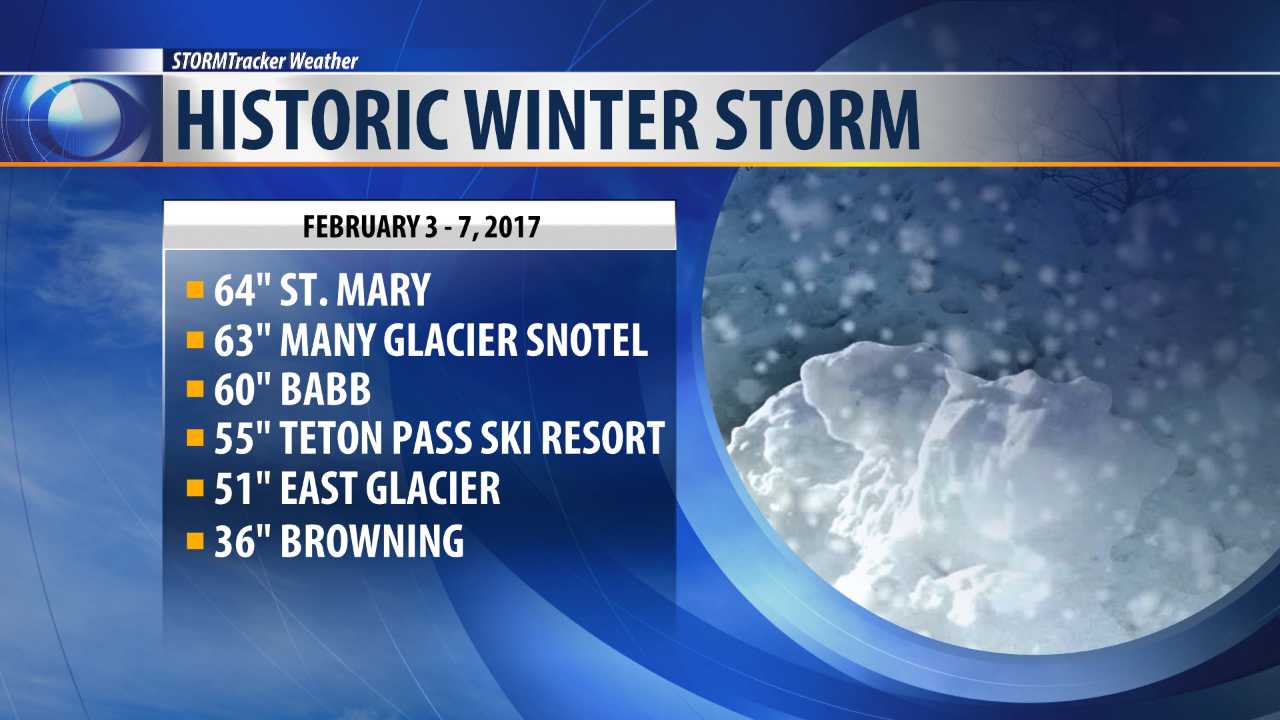
Our family and friends in Montana are experiencing horrific weather—roads are treacherous or closed, the weight of snow is collapsing buildings—it’s awful! And while our area of Montana didn’t see these huge snowfalls they have been inundated with more snow than has fallen in a long time during winter!
All these locations are in NW Montana.
We’ve been busy around here—more on that later but we took time out today to visit with Elmer and Henrietta who drove up from Casa Grande to spend a couple days at Larry and Geri’s.
Check out Jim and Sandie’s blog—they recently went to San Luis, Sonora, Mexico outside Yuma for dental work. They are very pleased with the work done by Dr. Bernal and very happy to avoid being accosted by all the vendors and street people in Algodones.
It was a beautiful, warm, sunny day here in Arizona—perfect weather!
Mike is a retired rancher/construction company owner. Janna is a retired registered nurse. We met almost 20 years ago and in spite of sounding corny, it was love at first sight. We have been truly blessed in our lives together.
We enjoy being outdoors with our little Schnauzer, Emmi.
Janna loves to quilt, cook, and read. Mike builds furniture, researches "stuff" on the computer and is a Sudoku pro. He is also the chief mechanic for all our older stuff such as the 1996 Country Coach motor home we now travel in! We love retirement!


 . So, I started cruising eBay using good advice from


 Grandpa Nat is going to teach Lora how to pitch horseshoes???
 All these locations are in NW Montana.
 Posts
Posts


